About Permissions
Account-level Permissions vs. Program-level Permissions#
LaunchPath has been architected to allow multiple innovation programs to be nested within a single corporate account. As illustrated in the table below, all permissions accept for the fundamental ability to log into the account are managed at the program level rather than at the account level.
| Permission Scope | Permissions |
|---|---|
| Account | User authentication (i.e. the ability to log into LaunchPath |
| Specific Programs | All other permissions |
Therefore, for any given user, there are two questions to be answered regarding his/her permissions:
- What programs should he/she be permitted to participate in?
- What permissions should he/she have within each program?
Who May Do What in LaunchPath?#
User permission categories#
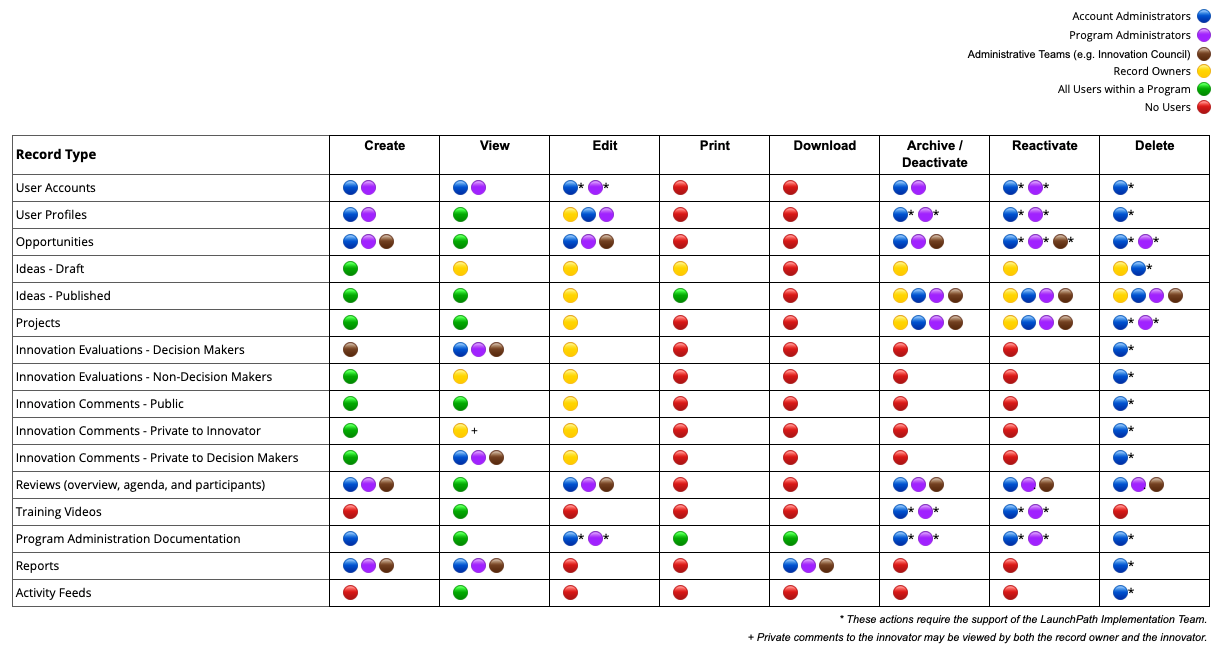
Within LaunchPath, user permissions are bundled into five basic categories, as follows:
- Account Administrator: This is a single individual appointed by the Account Owner who has ultimate authority over all account and program settings.
- Program Administrators: These are the primary administrators of individual innovation programs within a LaunchPath corporate account. If an account only has one program, the Program Administrator and the Account Administrator are typically the same person.
- Administrative Teams: These are individuals or groups who do not have direct access to Program Settings, but who have been granted special permissions (e.g. the ability to create opportunity records, schedule innovation reviews, execute decisions, etc.) in order to support the overall administration of the innovation program. Typical administrative teams include one or more decision-making bodies and an innovation support team.
- Record Owners: The creators of any record within LaunchPath typically has unique permissions to view, edit, archive, delete, etc. the record that he/she created.
- All Users within a Program: All users within any LaunchPath program have permissions that are beyond the control of Account and Program Administrators.
Special permissions that may be granted to Administrative Teams#
Any combination of the following special permissions may be granted to an Administrative Team:
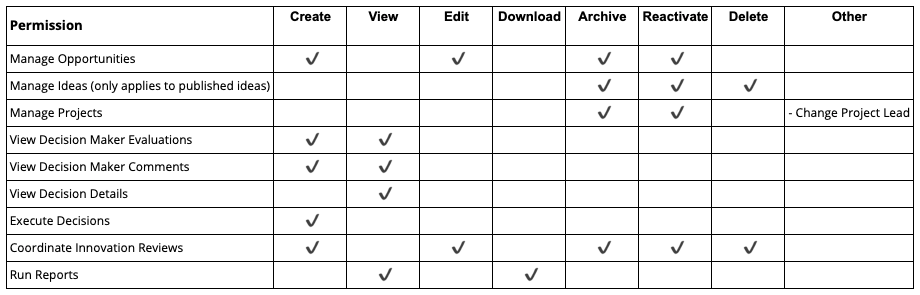
Additionally, Administrative Teams may be granted access to any combination of the following event notification email subscriptions:
- Idea Published
- Idea Submitted
- Idea Advanced (i.e. authorized for conversion to a project)
- Project Submitted
- Project Advanced (i.e. from one stage of development to another) For more details, please see "How to Create and Modify Administrative Teams"
Who may do what?#
The following table summarizes who may do what within LaunchPath.